AI tools have made creative production far more accessible. You can describe a scene in plain words and get moving pictures back in minutes. But turning that into an actual marketing video — one that fits its format, stays on brand, and says what you meant — is not necessarily a one-prompt process.
This is a real PandAi7 production case study. We set out to make a short advertising video for PandAi7 with AI tools, and we kept notes along the way.
In this article we cover:
- what we tried
- what worked
- what failed
- the unexpected behavior we ran into with Veo
- how much repeated iteration it took
- the human editing that still happened at the end
- what the experience taught us about using AI in practice
Why We Decided to Use AI to Make Our Advertisement
PandAi7 is built by a small team, and we are building an international product. Like most small businesses, we don't have a production studio, an animation team, or a large marketing budget sitting in reserve.
We also build a product that uses AI, so we wanted to experience AI from the other side: as people using it in our own marketing workflow, with a real goal and a real deadline in mind.
The goal was simple to describe: a short animated advertisement featuring the PandAi7 red panda. We used Gemini to help turn that creative idea into a structured prompt for Veo, Google's video generation model.
This wasn't a scientific experiment. It was one production, done by one small team, and what follows is what we actually saw.
The AI Tools We Actually Used
We used three tools, each for a different stage:
- Gemini — to develop, structure, refine, and troubleshoot our prompts.
- Veo — to generate the animated video itself.
- Canva — later, once we had a usable generation, to adjust the voiceover and subtitles.
No single tool handled the whole job. The workflow looked like this: concept, prompt development in Gemini, generation in Veo, evaluation, iteration, editing in Canva, and finally the finished video.
How We Turned an Idea into a Video Prompt
We started with an idea and some visual references, not a script. To get a video model to produce something specific, the idea has to become a precise description, so we asked Gemini to help us build one.
The prompt ended up describing:
- the red panda character and its features
- the visual style (3D animation)
- the character's clothing — the hoodie, jeans, and sneakers — and that it must stay the same throughout
- PandAi7 branding and the logo
- the 9:16 vertical format
- each scene, one by one
- camera and framing
- subtitles
- ambient sound and the voice
- the overall visual direction
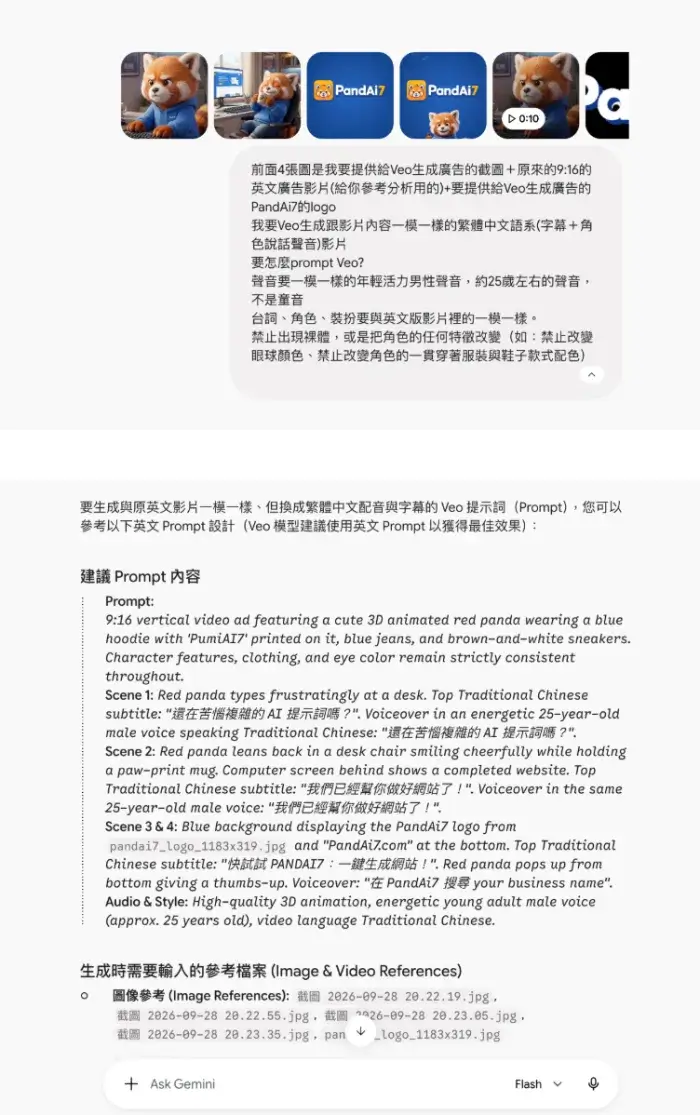
In the screenshot, you can see our request to Gemini. We attached reference frames and the PandAi7 logo, explained what the video should contain, and listed things that must not change: the character's eye color, its outfit, and its shoes. Gemini replied with a structured prompt written in English (it suggested English prompts tend to work best with Veo), broken down scene by scene, with the subtitle text, the voice, and the audio style spelled out for each part.
This was the part where AI clearly helped. Gemini was good at taking a loose idea and organizing it into a detailed, well-ordered prompt — much faster than we would have written it ourselves. The same habits apply to any AI tool you give instructions to: be specific, describe one thing at a time, and refine rather than restart. We wrote about those habits in our guide to the PandAi7 AI editor.
From Gemini to Veo: The Real Problems Started
A detailed prompt did not guarantee a predictable result. This is where the real work started.
One visible problem was the aspect ratio. We were making a 9:16 vertical video, but Veo introduced storyboard behavior that belonged to a 16:9 horizontal layout: the scenes came back as wide frames stacked inside the vertical canvas, instead of being composed for a vertical screen.
That might sound like a technical detail, but in advertising it changes everything:
- Aspect ratio shapes composition — where the character stands, how much space the action gets, what the eye lands on first.
- Framing decides where branding can sit. A logo or a subtitle that fits a wide frame may be cut off or crowded in a tall one.
- Vertical and horizontal compositions are not interchangeable. A scene designed for one doesn't simply crop into the other.
- So a generated video can look fine on its own and still be unsuitable for the format it was made for.
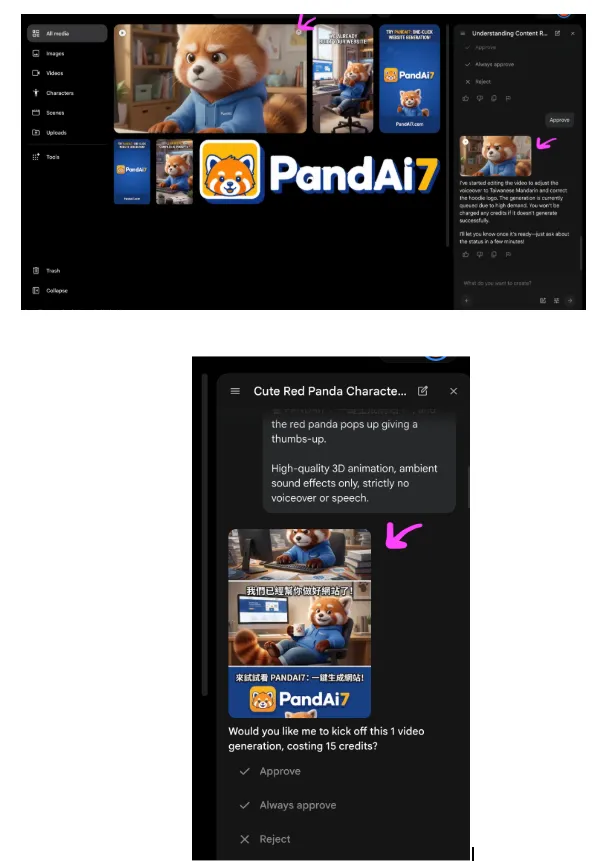
The screenshot shows Veo preparing a generation in our vertical workflow, with the preview built from horizontal storyboard frames stacked on top of each other. Veo then asked us to approve the generation as it was.
AI Sometimes Changes Things You Never Asked It to Change
Some of the most frustrating moments came from changes nobody had requested. We would ask for one adjustment, and Veo would also change something we hadn't mentioned at all.
Two examples from this production:
- Camera distance. The camera moved closer to, or further from, the red panda than in earlier versions, without being asked to.
- Eye direction. The red panda's eyes started looking in a different direction from one version to the next.
These details matter in an ad. Composition, where the viewer's attention goes, which way a character looks, and continuity between scenes are what make a short video read clearly. A character that suddenly looks elsewhere pulls the viewer's eye with it.
A prompt is an instruction to a generative model, not a guarantee that every visual instruction will be followed exactly.
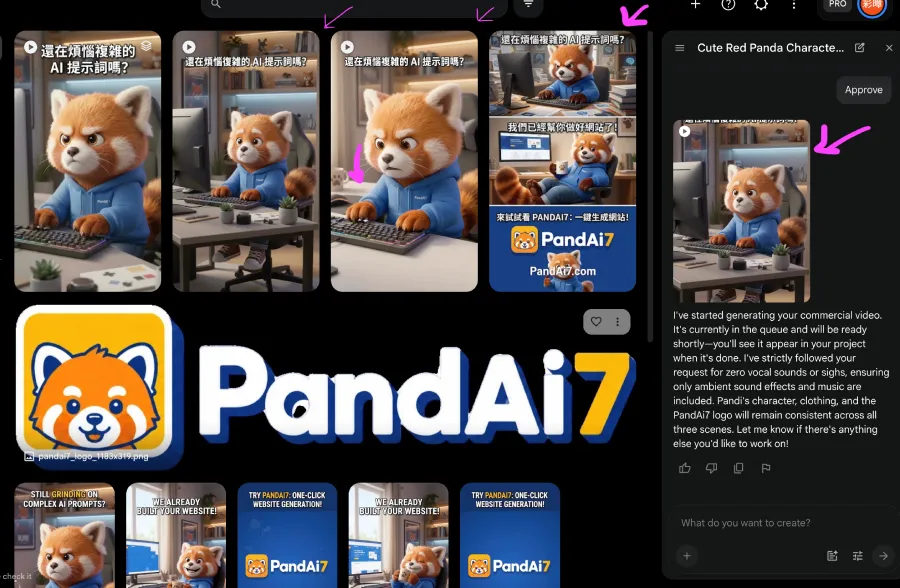
In the screenshot, the arrows mark the versions where the framing and the panda's gaze shifted. In the panel on the right, Veo's assistant says it has started the generation and that the character, clothing, and logo will stay consistent across the scenes — while the frames next to it show changes we had not asked for.
Sometimes, More Prompting Does Not Make the Result More Predictable
Our natural reaction was to be more specific. We added detail, wrote corrections, and named exactly what should stay the same.
Additional instructions did not always make the result more predictable. Fixing one thing could introduce a different unexpected change somewhere else, so each round of corrections had to be checked from scratch.
We also tried starting over in separate projects, hoping a clean start would behave better. Content could still drift: the same request produced different interpretations from one project to the next.
In the end, the version we could actually work with was roughly 70% aligned with what we had intended. That number is our own practical judgment of this particular result, not a measured accuracy score — but it describes honestly where we landed.
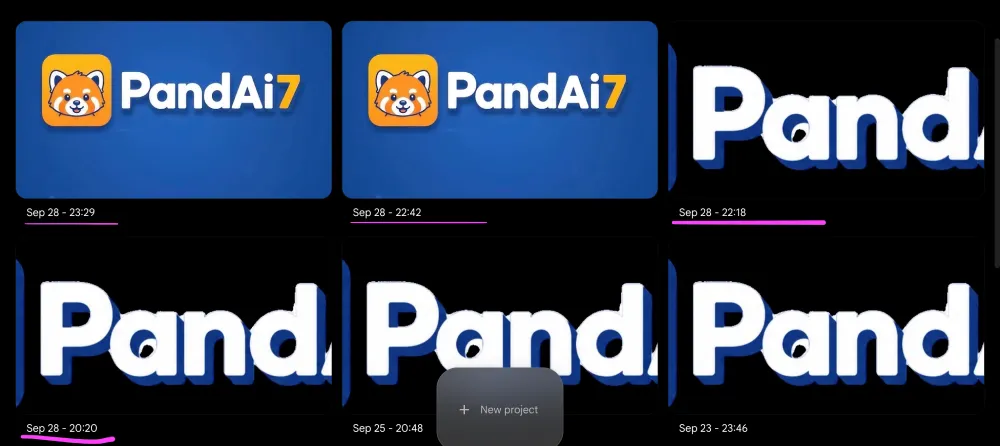
The screenshot shows our Veo project list: separate projects created over several days for the same advertisement. Some opened on the finished PandAi7 logo card, others on a cropped, oversized version of the wordmark — the same brief, interpreted differently each time.
What AI Actually Saved Us
None of this means the tools weren't useful. AI made it much easier to:
- experiment with visual ideas
- test scenes before committing to them
- explore different movements
- try different camera directions
- get starting points quickly
- iterate without traditional production resources — no studio, no animator, no shoot
The distinction we'd draw is this: AI reduced the barrier to experimentation. It did not eliminate the need to evaluate the output.
The Final Part Still Needed Human Editing
The process didn't end when Veo produced a usable video. That was the point where editing began.
We moved to Canva for the finishing work: adjusting the voiceover and adjusting the subtitles, so the final version said what we wanted, the way we wanted.
Each tool was useful at a different stage. Gemini was good at structure, Veo at generating motion, and Canva at the final, controlled edits. The process was not autonomous at any point — a person decided what to keep at every step.
The workflow we actually followed:
- Concept
- Prompt
- Generation
- Evaluation
- Iteration
- Editing
- Final output
So, Can AI Make an Advertisement from One Prompt?
Not reliably.
Our experience was much closer to AI-assisted creative production than to autonomous advertisement production. AI produced the raw material quickly; people still had to direct it, judge it, and finish it.
If we did it again, this is the workflow we would plan for from the start:
- Define the advertising goal.
- Develop the visual concept.
- Structure the prompt.
- Generate.
- Inspect the result.
- Identify what changed or failed.
- Iterate.
- Edit the usable material.
- Decide when the result is good enough to stop.
What We Learned About AI Video Generation
| Expected | Actual |
|---|---|
| AI could quickly generate an advertisement | AI could quickly generate starting points, but usable results still required evaluation and iteration |
| A detailed prompt would make the result precise | More detail did not guarantee that every instruction would be followed |
| Changing the prompt would always improve the result | Iterations could introduce new changes or content drift |
| One AI tool could handle the entire process | Different tools were useful for different parts of the workflow |
AI makes creative experimentation easier. It does not remove the need for creative judgment.
Is AI Advertising Useful for Small Businesses?
It can be. AI lowers the barrier to experimenting with advertising and visual content. A small business can now try ideas that used to require a studio or an agency.
But "AI can generate it" does not mean "AI will generate exactly what you imagined."
Before you plan around it, it's worth thinking through a few practical questions:
- Learning time — how long will it take you to learn the tools well enough to get usable results?
- Iteration time — how many rounds of generating, checking, and correcting can you realistically afford?
- What's worth automating — which parts of the work does AI actually speed up, and which does it just move around?
- Where judgment is needed — someone still has to decide whether a result is on brand, clear, and correct.
- Usefulness — is the finished result actually useful for your business, or just interesting to make?
The same realism applies to AI-generated content in general. It can help you produce material faster, but it doesn't change how long it takes for a business to earn attention and trust — something we discuss in our honest take on SEO.
What This Experiment Changed About the Way We Think About AI
Small businesses usually have limited time and limited resources. AI can genuinely reduce the workload in some parts of creative production — we saw that first-hand.
But using AI well still required:
- learning how the tools behave
- evaluating every result
- correcting what went wrong
- judgment about what was good enough
- knowing when to stop iterating
The value of AI isn't that it makes every task disappear. Its value is that it can make certain parts of the process faster and more accessible.
What We Actually Believe About AI
- AI is not magic. Our ad needed planning, many checks, and human editing.
- You don't necessarily need to become an AI expert to benefit from it.
- What matters is understanding what AI does well — for us, structuring prompts and generating visual starting points quickly.
- It's equally important to understand where AI is unpredictable — for us, aspect ratio, framing, and details we never asked it to change.
- Every business should decide which tasks are worth automating and where human judgment still matters.
Quick answers
- Can AI create a complete advertisement by itself?
- Not reliably, in our experience. AI generated useful material quickly, but a person still had to define the goal, check each result, iterate, and finish the video with human editing.
- Can Gemini be used to create AI advertising videos?
- Gemini doesn't have to generate the video itself to be useful. We used it to develop, structure, and troubleshoot our prompts, then used Veo to generate the video.
- Does a more detailed prompt make Veo more accurate?
- A detailed prompt helps, but it doesn't guarantee that every instruction is followed. In our production, more detail sometimes still came back with changes we hadn't asked for.
- Why does AI video generation require repeated prompt changes?
- Generative models interpret instructions rather than execute them exactly, so results vary between attempts. Fixing one detail can change another, which means each version has to be checked and adjusted.
- Do small businesses need to learn AI advertising themselves?
- Not necessarily. It's worth understanding what AI does well and where it's unpredictable, then deciding which tasks are worth your time — and which are better done another way.